
I am them - pt2
📦 A chaotic meme sticker pack with Flork-like absurd reactions, animals, kids, and dramatic facepalm moments. For joking, reacting, teasing, and expressing awkward or dramatic feelings. The 'I am them - pt2' pack includes 12 stickers for any conversation. Free download to install on WhatsApp and Telegram.
-

😫 Green beans attack
A monkey intensely trying to handle a bowl of green beans. When the situation is oddly difficult or you’re struggling with a small task.
-

😄 Serving energy
A goofy bird ladles something with a huge grin. For cheerful, over-the-top enthusiasm.
-

😐 Deadpan dinner
A clay penguin sits at the table with a blank stare and utensils ready. For awkward silence, disappointment, or being emotionally unavailable.
-

💅 So fancy
A woman poses with a playful, confident stance and raised hands. For jokingly acting stylish, dramatic, or extra.
-

😡 Tiny teeth rage
A tiny dog snarls right into the camera. For fake anger, defensive energy, or overreacting.
-

❤️ Peekaboo heart
A child forms a heart shape in front of their face. For affection, sweetness, or playful love.
-
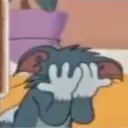
🤦 Facepalm overload
A cartoon cat covers its face in total embarrassment. For secondhand embarrassment or being done with everything.
-
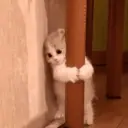
👀 Stuck and judging
A kitten clings to a post while peeking around it. For hesitating, spying, or awkwardly lingering.
-

😾 Pet me with respect
A grumpy cat tolerates a hand touching its chest. For reluctant affection, tolerance, or judging the person petting you.
-

🤨 Skeptical dog
A dog stares with raised brows and a judging expression on the couch. For disbelief, side-eye, or mild judgment.
-

😏 The side-eye kid
A kid glances sideways with a sly little smile. For suspicion, teasing, or knowing too much.
-

🤦 Homer fail
A cartoon woman facepalms in the kitchen after seeing the obvious. For obvious mistakes, self-judgment, or exasperation.
Stickers
Download and Install on WhatsApp
The Sticker Maker app is necessary to install this sticker pack on your WhatsApp. If you don't have it, download it from: Google Play Store and App Store . Once you have it on your phone, follow these instructions:
- Download the sticker file we provide below (it has the .wastickers extension). Locate the downloaded file on your mobile and tap it. Your device will ask you which application you want to open it with; select Sticker Maker. The app will automatically recognize the file as a new sticker pack.
- Once you see the pack inside Sticker Maker, just press the button that says "Add to My Library", then "Add to WhatsApp" and that's it! Your new stickers will be available for use in all your WhatsApp conversations.
Installation on WhatsApp with Sticker.ly
An easy way to add this pack is through the Sticker.ly app. If you don't have it yet, download it from: Google Play Store and App Store . Then choose one of these two simple methods:
- With Direct Link: Simply tap this link to the pack 3VBL9H . If you have Sticker.ly installed, you will immediately see the stickers in the app.
- Using the Pack Code: If you prefer, you can copy the "pack code" by tapping here: 3VBL9H and paste it into the search bar inside the Sticker.ly app.
Once inside Sticker.ly, confirm the action by tapping "Add to WhatsApp" and the stickers will be instantly sent to your WhatsApp app.
Use on Telegram
For Telegram users, installing a sticker pack is a native and extremely simple process. Just follow this link that will take you to Telegram: stickerly_3VBL9H_by_stickerly_official_bot . When the app opens, you will instantly see the pack and can add it to your library, without the need for third-party apps.
Share this page