Love yani aşk
📦 The 'Love yani aşk' pack includes 29 stickers for daily chats. Free download to install on WhatsApp and Telegram.
-

İyi geceler Pofuduukgiller Beybifeysine ekmek bandıgım
-

AKLIMDA SEN VARKEN moodumpat DERSLERE NASIL ÇALIŞAYIM
-

Moodumpat şaşkın olmak istiyorum ama ş olmadan
-
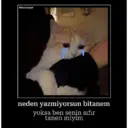
Moodumpat neden yazmiyorsun bitanem yoksa ben senin sıfır tanen miyim
-

MOODUMPAT bugun bici bici yarin mektep var
-

MOODUMPAT beni opmiceksen dudaklarimiz neden var?!?!
-
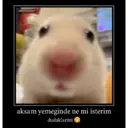
MOODUMPAT aksam yemeginde ne mi isterim dudaklarini
-

MOODUMPAT yaşamak için güzel bi sebep sen
-
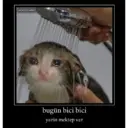
MOODUMPAT bugün bici bici yarin mektep var
-

iyi geceler der misin cunku sen demedigin surece iyi degil geceler
-

MOODUMPAT iyi geceler opucugu alabilir miyim mumkunse dudaktan
-

MOODUMPAT gunaydinn opucugu alabilir miyim mumkunse dudaktan
-

MOODUMPAT gözlerin cok guzelmiste bir omur bakisabilir miyiz rica etsem
-

PERIL benim derslere değil sana ihtiyacim var -- and MOODUMPAT
-

MOODUMPAT şey şekerim düşmüşte dudaklarini yiyebilir miyim
-

@borekpp dudagini isirmamam icin sebep sanirim yok
-

MOODUMPAT 1/3 sıcak şeyleri pek sevmem dudakların hariç
-

MOODUMPAT seviyorsan ölümüne sevmiyorsan düğünüme beklerim
-

MOODUMPAT dünya fani, öpim ani bikerecik opsen ne olur yani
-

MOODUMPAT Bu bir soygundur hemen dudaklarini bana ver
-

MOODUMPAT kapinda koleyim her gün sana öleyim nasilsin bebegim mwwah
-

@borekpp o tatli yanaklarini opcem opebilir miyim demedim
-

MOODUMPAT hicbiseye baglanmadim sen haric
-

MOODUMPAT sadece aklıma gelmen hic hos degil opmenide bekliyorum
-

MOODUMPAT sadece aklıma gelmen hic hos degil yatagimada bekliyorum
-

MOODUMPAT aklımda tek bisey oda dudaklarin va
-

MOODUMPAT aklımda tek bisey oda sen
-

MOODUMPAT benim annem beraber uyumamıza izin verdi senin annende izin verirse cabuk gel
-

gercekten iğrenç bi hayat
Stickers
📃 İyi geceler Pofuduukgiller Beybifeysine ekmek bandıgım
📃 AKLIMDA SEN VARKEN moodumpat DERSLERE NASIL ÇALIŞAYIM
📃 Moodumpat şaşkın olmak istiyorum ama ş olmadan
📃 Moodumpat neden yazmiyorsun bitanem yoksa ben senin sıfır tanen miyim
📃 MOODUMPAT bugun bici bici yarin mektep var
📃 MOODUMPAT beni opmiceksen dudaklarimiz neden var?!?!
📃 MOODUMPAT aksam yemeginde ne mi isterim dudaklarini
📃 MOODUMPAT yaşamak için güzel bi sebep sen
📃 MOODUMPAT bugün bici bici yarin mektep var
📃 iyi geceler der misin cunku sen demedigin surece iyi degil geceler
📃 MOODUMPAT iyi geceler opucugu alabilir miyim mumkunse dudaktan
📃 MOODUMPAT gunaydinn opucugu alabilir miyim mumkunse dudaktan
📃 MOODUMPAT gözlerin cok guzelmiste bir omur bakisabilir miyiz rica etsem
📃 PERIL benim derslere değil sana ihtiyacim var -- and MOODUMPAT
📃 MOODUMPAT şey şekerim düşmüşte dudaklarini yiyebilir miyim
📃 @borekpp dudagini isirmamam icin sebep sanirim yok
📃 MOODUMPAT 1/3 sıcak şeyleri pek sevmem dudakların hariç
📃 MOODUMPAT seviyorsan ölümüne sevmiyorsan düğünüme beklerim
📃 MOODUMPAT dünya fani, öpim ani bikerecik opsen ne olur yani
📃 MOODUMPAT Bu bir soygundur hemen dudaklarini bana ver
📃 MOODUMPAT kapinda koleyim her gün sana öleyim nasilsin bebegim mwwah
📃 @borekpp o tatli yanaklarini opcem opebilir miyim demedim
📃 MOODUMPAT hicbiseye baglanmadim sen haric
📃 MOODUMPAT sadece aklıma gelmen hic hos degil opmenide bekliyorum
📃 MOODUMPAT sadece aklıma gelmen hic hos degil yatagimada bekliyorum
📃 MOODUMPAT aklımda tek bisey oda dudaklarin va
📃 MOODUMPAT aklımda tek bisey oda sen
📃 MOODUMPAT benim annem beraber uyumamıza izin verdi senin annende izin verirse cabuk gel
📃 gercekten iğrenç bi hayat
Download and Install on WhatsApp
The Sticker Maker app is necessary to install this sticker pack on your WhatsApp. If you don't have it, download it from: Google Play Store and App Store . Once you have it on your phone, follow these instructions:
- Download the sticker file we provide below (it has the .wastickers extension). Locate the downloaded file on your mobile and tap it. Your device will ask you which application you want to open it with; select Sticker Maker. The app will automatically recognize the file as a new sticker pack.
- Once you see the pack inside Sticker Maker, just press the button that says "Add to My Library", then "Add to WhatsApp" and that's it! Your new stickers will be available for use in all your WhatsApp conversations.
Installation on WhatsApp with Sticker.ly
An easy way to add this pack is through the Sticker.ly app. If you don't have it yet, download it from: Google Play Store and App Store . Then choose one of these two simple methods:
- With Direct Link: Simply tap this link to the pack TE3J3A . If you have Sticker.ly installed, you will immediately see the stickers in the app.
- Using the Pack Code: If you prefer, you can copy the "pack code" by tapping here: TE3J3A and paste it into the search bar inside the Sticker.ly app.
Once inside Sticker.ly, confirm the action by tapping "Add to WhatsApp" and the stickers will be instantly sent to your WhatsApp app.
Use on Telegram
For Telegram users, installing a sticker pack is a native and extremely simple process. Just follow this link that will take you to Telegram: stickerly_TE3J3A_by_stickerly_official_bot . When the app opens, you will instantly see the pack and can add it to your library, without the need for third-party apps.
Share this page